
AI 迁移提示
本文由 AI 协助从旧站迁移,尚未完成逐篇人工审校;内容如有疏漏,将在复核后修订。
> 本文部分内容由 AI 辅助整理,已结合实际操作进行校验,请根据自身环境谨慎使用。
一个带有温度感的侧边小组件——显示当前时间、日期、星期,并根据早中晚不同时段切换问候语和背景图片,让博客更有"人味"。
一、功能概览
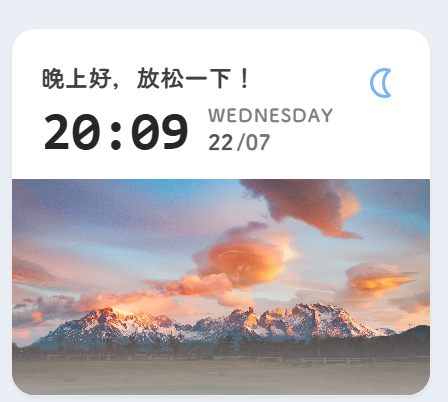
主要能力:
- 实时数字时钟,每分钟自动更新
- 6 个时段的问候语切换(深夜/早晨/上午/中午/下午/晚上)
- 每个时段对应不同的图标和随机风景背景图
- SPA 页面切换时自动恢复运行
二、核心实现
组件完整源码
---
import { Icon } from "astro-icon/components";

interface Props { class?: string; style?: string; }
const { class: className, style } = Astro.props;
---

<div id="time-greeting" class:list={["card-base flex flex-col relative overflow-hidden", className]} style={style}>
    <div class="px-5 pt-5 pb-3 flex justify-between items-start">
        <div class="flex flex-col gap-1">
            <span class="text-base font-bold text-neutral-700 dark:text-neutral-300 greeting-text">正在获取时间...</span>
            <div class="flex items-end gap-3 text-neutral-800 dark:text-neutral-200">
                <div class="flex items-baseline">
                    <span class="text-4xl font-bold font-mono time-display">--:--</span>
                </div>
                <div class="flex flex-col mb-[0.15rem]">
                    <span class="text-xs font-bold opacity-60 uppercase tracking-wider date-week">---</span>
                    <div class="flex items-baseline text-sm font-bold opacity-80">
                        <span class="date-day">--</span>
                        <span class="opacity-80 ml-0.5 date-month">/--</span>
                    </div>
                </div>
            </div>
        </div>
        <div class="text-2xl text-(--primary) greeting-icons mt-1 opacity-80">
            <Icon name="material-symbols:mode-night-outline-rounded" class="hidden icon-night" />
            <Icon name="material-symbols:wb-twilight-rounded" class="hidden icon-morning" />
            <Icon name="material-symbols:wb-sunny-outline-rounded" class="hidden icon-noon" />
            <Icon name="material-symbols:nightlight-outline-rounded" class="hidden icon-evening" />
        </div>
    </div>
    <div class="w-full h-36 relative overflow-hidden time-image-container">
        <div class="absolute inset-0 bg-cover bg-center transition-opacity duration-1000 opacity-0 time-image"></div>
        <div class="absolute inset-0 bg-gradient-to-t from-(--card-bg) via-transparent to-transparent opacity-60"></div>
    </div>
</div>

<script is:inline>
  (() => {
  const weekDays = ['Sunday','Monday','Tuesday','Wednesday','Thursday','Friday','Saturday'];
  if (!window.timeGreetingImage) { window.timeGreetingImage = `https://random-api.czl.net/pic/fj?t=${new Date().getTime()}`; }
  function updateTimeGreeting() {
    const now = new Date(); const hours = now.getHours(); const minutes = now.getMinutes();
    const month = (now.getMonth()+1).toString().padStart(2,'0');
    const day = now.getDate().toString().padStart(2,'0');
    const hoursStr = hours.toString().padStart(2,'0');
    const minutesStr = minutes.toString().padStart(2,'0');
    let greeting='', period='';
    if (hours>=0&&hours<6) { greeting='夜深了,早点休息!'; period='night'; }
    else if (hours>=6&&hours<9) { greeting='早上好,新的一天!'; period='morning'; }
    else if (hours>=9&&hours<12) { greeting='上午好,充满活力!'; period='noon'; }
    else if (hours>=12&&hours<14) { greeting='中午好,记得午休!'; period='noon'; }
    else if (hours>=14&&hours<18) { greeting='下午好,继续加油!'; period='noon'; }
    else if (hours>=18&&hours<24) { greeting='晚上好,放松一下!'; period='evening'; }
    document.querySelectorAll('.date-day').forEach(e=>e.textContent=day);
    document.querySelectorAll('.date-month').forEach(e=>e.textContent=`/${month}`);
    document.querySelectorAll('.date-week').forEach(e=>e.textContent=weekDays[now.getDay()]);
    document.querySelectorAll('.time-display').forEach(e=>e.textContent=`${hoursStr}:${minutesStr}`);
    document.querySelectorAll('.greeting-text').forEach(e=>e.textContent=greeting);
    document.querySelectorAll('.greeting-icons').forEach(c=>{c.querySelectorAll('svg').forEach(i=>{i.classList.toggle('hidden',!i.classList.contains(`icon-${period}`));});});
    document.querySelectorAll('.time-image').forEach(e=>{
      if(e.getAttribute('data-image-set')!=='true'){e.style.backgroundImage=`url('${window.timeGreetingImage}')`;e.setAttribute('data-image-set','true');setTimeout(()=>e.classList.replace('opacity-0','opacity-100'),50);}
    });
  }
  if(window.timeGreetingInterval) clearInterval(window.timeGreetingInterval);
  window.timeGreetingInterval=setInterval(updateTimeGreeting,60000);
  updateTimeGreeting();
  document.addEventListener("swup:contentReplaced",()=>updateTimeGreeting());
  })();
</script>
三、注册组件
在 src/components/layout/SideBar.astro 中导入:
import Advertisement from "@/components/widget/Advertisement.astro";
import Announcement from "@/components/widget/Announcement.astro";
import Calendar from "@/components/widget/Calendar.astro";
// ...
import TimeGreeting from "@/components/widget/TimeGreeting.astro";
同时在 componentMap 中注册:
const componentMap = {
    profile: Profile,
    announcement: Announcement,
    categories: Categories,
    // ...
    timeGreeting: TimeGreeting,
    dynamic: Dynamic,
    schedule: Schedule,
    quoteOfTheDay: QuoteOfTheDay,
};
四、注册类型
在 src/types/sidebarConfig.ts 的类型联合中添加组件名:
export type WidgetComponentType =
    | "stats"
    | "calendar"
    | "music"
    | "siteInfo"
    | "timeGreeting";
五、配置方式
在 sidebarConfig.ts 的右侧边栏中配置:
{
  type: "timeGreeting",
  enable: true,
  position: "top",
  showOnPostPage: false,
}
六、相关文件
组件:/src/components/widget/TimeGreeting.astro
相关源码:olinll/firefly-blog
🔗 最后
这个组件原本是一个简单的时钟,逐步迭代加入了时段问候和随机背景图。如果你想自定义问候语或时段划分,直接在源码中修改即可。
评论区
评论加载中...