
AI 迁移提示
本文由 AI 协助从旧站迁移,尚未完成逐篇人工审校;内容如有疏漏,将在复核后修订。
> 本文部分内容由 AI 辅助整理,已结合实际操作进行校验,请根据自身环境谨慎使用。
时间进度条是一个让人又爱又恨的小组件——它直观地告诉你这一年、这一个月、这一周已经过去了多少,还贴心地显示距离下一个法定节假日还有几天。
一、功能概览
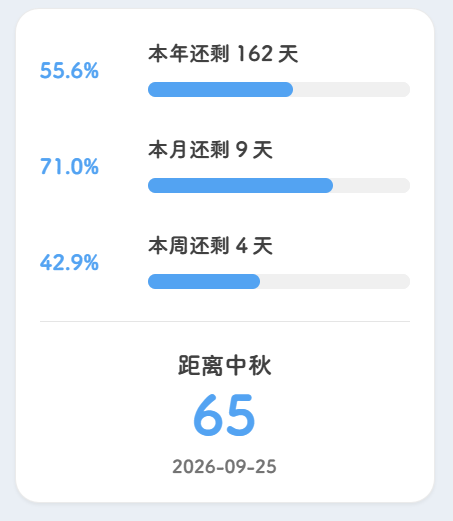
三个维度的进度条:
- 本年进度 — 今年已经过去了多少天
- 本月进度 — 本月已经过去了多少天
- 本周进度 — 本周已经过去了多少天
底部还有法定节假日倒计时。
二、核心实现
组件完整源码
---
import WidgetLayout from "@/components/common/WidgetLayout.astro";

interface Props {
    class?: string;
    style?: string;
}

const { class: className, style } = Astro.props;
---

<WidgetLayout id="schedule-widget" class={className} style={style}>
  <div class="schedule-container">
    <div class="progress-section space-y-4">
      <div class="progress-item flex items-center gap-3">
        <span class="text-[14px] font-semibold text-(--primary) shrink-0 w-[60px] year-progress">--%</span>
        <div class="flex-1 min-w-0">
          <span class="text-sm text-neutral-700 dark:text-neutral-300 year-days-left">本年还剩 -- 天</span>
          <progress max="365" class="schedule-progress-bar pBar_year" value="0"></progress>
        </div>
      </div>
      <div class="progress-item flex items-center gap-3">
        <span class="text-[14px] font-semibold text-(--primary) shrink-0 w-[60px] month-progress">--%</span>
        <div class="flex-1 min-w-0">
          <span class="text-sm text-neutral-700 dark:text-neutral-300 month-days-left">本月还剩 -- 天</span>
          <progress max="31" class="schedule-progress-bar pBar_month" value="0"></progress>
        </div>
      </div>
      <div class="progress-item flex items-center gap-3">
        <span class="text-[14px] font-semibold text-(--primary) shrink-0 w-[60px] week-progress">--%</span>
        <div class="flex-1 min-w-0">
          <span class="text-sm text-neutral-700 dark:text-neutral-300 week-days-left">本周还剩 -- 天</span>
          <progress max="7" class="schedule-progress-bar pBar_week" value="0"></progress>
        </div>
      </div>
    </div>
    <div class="holiday-section mt-4 pt-4 border-t border-neutral-200 dark:border-neutral-700">
      <div class="text-center">
        <p class="text-base font-semibold text-neutral-700 dark:text-neutral-300 mb-0 nearest-holiday-full">距离 --</p>
        <p class="text-4xl font-bold text-(--primary) mb-2 nearest-holiday-days">--</p>
        <p class="text-xs text-neutral-500 dark:text-neutral-400 nearest-holiday-date">--</p>
      </div>
    </div>
  </div>
</WidgetLayout>

<script is:inline>
  (function () {
    const holidays = [
      { name: "元旦", month: 0, day: 1 },
      { name: "清明", month: 3, day: 4 },
      { name: "劳动节", month: 4, day: 1 },
      { name: "端午", month: 5, day: 19 },
      { name: "中秋", month: 8, day: 25 },
      { name: "国庆", month: 9, day: 1 },
    ];
    const formatDate = (date) => {
      const year = date.getFullYear();
      const month = String(date.getMonth() + 1).padStart(2, "0");
      const day = String(date.getDate()).padStart(2, "0");
      return `${year}-${month}-${day}`;
    };
    const getNearestHoliday = (now) => {
      const year = now.getFullYear();
      const dates = holidays.map((h) => ({ name: h.name, date: new Date(year, h.month, h.day) }))
        .concat({ name: "元旦", date: new Date(year + 1, 0, 1) })
        .filter((h) => h.date >= now).sort((a, b) => a.date - b.date);
      const nearest = dates[0];
      const days = Math.ceil((nearest.date - now) / 86400000);
      return { name: nearest.name, days: days === 0 ? "今天" : String(days), date: formatDate(nearest.date) };
    };
    const setText = (el, sel, val) => { const e = el.querySelector(sel); if (e) e.textContent = val; };
    const updateSchedule = () => {
      const now = new Date(); const year = now.getFullYear();
      const month = now.getMonth(); const day = now.getDate(); const weekDay = now.getDay() || 7;
      const isLeap = (year % 4 === 0 && year % 100 !== 0) || year % 400 === 0;
      const daysInYear = isLeap ? 366 : 365;
      const yearPassed = Math.floor((now - new Date(year, 0, 0)) / 86400000);
      const daysInMonth = new Date(year, month + 1, 0).getDate();
      const h = getNearestHoliday(now);
      document.querySelectorAll(".schedule-container").forEach((c) => {
        const yp = ((yearPassed / daysInYear) * 100).toFixed(1);
        const mp = ((day / daysInMonth) * 100).toFixed(1);
        const wp = ((weekDay / 7) * 100).toFixed(1);
        const pY = c.querySelector(".pBar_year"); if (pY) { pY.max = daysInYear; pY.value = yearPassed; }
        const pM = c.querySelector(".pBar_month"); if (pM) { pM.max = daysInMonth; pM.value = day; }
        const pW = c.querySelector(".pBar_week"); if (pW) pW.value = weekDay;
        setText(c, ".year-progress", `${yp}%`); setText(c, ".month-progress", `${mp}%`); setText(c, ".week-progress", `${wp}%`);
        setText(c, ".year-days-left", `本年还剩 ${daysInYear - yearPassed} 天`);
        setText(c, ".month-days-left", `本月还剩 ${daysInMonth - day} 天`);
        setText(c, ".week-days-left", `本周还剩 ${7 - weekDay} 天`);
        setText(c, ".nearest-holiday-full", `距离${h.name}`);
        setText(c, ".nearest-holiday-days", h.days);
        setText(c, ".nearest-holiday-date", h.date);
      });
    };
    const init = () => { updateSchedule(); const n = new Date(); const nxt = new Date(n.getFullYear(), n.getMonth(), n.getDate() + 1); setTimeout(() => { updateSchedule(); setInterval(updateSchedule, 86400000); }, nxt - n); };
    if (document.readyState === "loading") document.addEventListener("DOMContentLoaded", init, { once: true }); else init();
    document.addEventListener("astro:page-load", updateSchedule);
  })();
</script>

<style>
  .schedule-progress-bar { -webkit-appearance: none; appearance: none; border: none; width: 100%; height: 10px; border-radius: 5px; background-color: #f0f0f0; margin-top: 4px; }
  .schedule-progress-bar::-webkit-progress-bar { background-color: #f0f0f0; border-radius: 5px; }
  .schedule-progress-bar::-webkit-progress-value { background: var(--primary); border-radius: 5px; transition: width 0.3s ease; }
  .schedule-progress-bar::-moz-progress-bar { background: var(--primary); border-radius: 5px; }
  .dark .schedule-progress-bar, .dark .schedule-progress-bar::-webkit-progress-bar { background-color: #374151; }
</style>
三、注册组件
在 src/components/layout/SideBar.astro 中导入:
import Advertisement from "@/components/widget/Advertisement.astro";
import Announcement from "@/components/widget/Announcement.astro";
import Calendar from "@/components/widget/Calendar.astro";
//...
import Schedule from "@/components/widget/Schedule.astro";
// ...
同时在 componentMap 中注册:
const componentMap = {
    profile: Profile,
    announcement: Announcement,
    categories: Categories,
    tags: Tags,
    // ...
    schedule: Schedule,
    quoteOfTheDay: QuoteOfTheDay,
};
四、注册类型
在 src/types/sidebarConfig.ts 的类型联合中添加组件名:
export type WidgetComponentType =
    | "githubHeatmap"
    | "timeGreeting"
    | "dynamic"
    | "schedule"
    | "quoteOfTheDay";
五、配置方式
在 sidebarConfig.ts 中注册:
{
  type: "schedule",
  enable: true,
  position: "sticky",
  showOnPostPage: false,
}
六、相关文件
组件:/src/components/widget/Schedule.astro
相关源码:olinll/firefly-blog
🔗 最后
这个组件虽然代码不多,但非常实用——把它放在侧边栏或移动端底部,每次浏览博客时瞄一眼,对时间的感知会更强烈。
评论区
评论加载中...